 FAQs
FAQs
The basics, without having to dig through everything else first.
These answers are meant to clear up the questions that come up most often around joining, account linking, whitelist access, and moderation visibility.
How do I get access to STEMCraft?
Access is usually arranged through a workshop, community program, or direct onboarding (only in some circumstances).
If you are unsure whether you already have access, login to the website and under the user menu, check if you have STEMCraft listed:
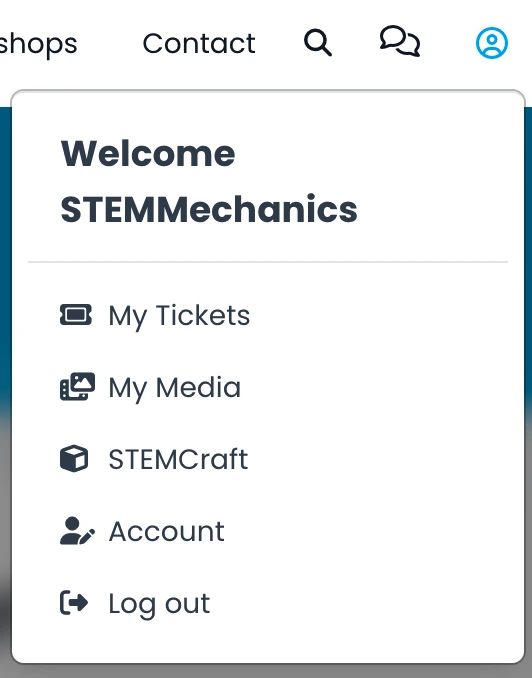
From that menu item, you can add your Minecraft accounts to the server. Contact us if you have any issues.
Do I need a website account?
Generally yes. The website is used to manage linked Minecraft usernames and whitelist access for players or programs. It also allows us to have the contact details of the parent if issues arise.
Can I join using Java/Bedrock
Sure! The server supports both Java and Bedrock players. Generally you require the latest version and a valid Minecraft account to join. You can visit the STEMCraft Discussions to see the current version and other news.
What Minecraft version does the server run?
Just like Minecraft at home, STEMCraft server runs on a specific Minecraft version. You can see the current server version on the STEMCraft Overview page.
Newer Minecraft game versions can sometimes still join, but mobs, blocks, or items added after the server’s version may not appear in the game yet.
For news about upgrades and upcoming updates, visit the STEMCraft Discussions.
Why does my linked account say UUID pending?
That usually means the server has not seen that Minecraft account log in yet. Once it does, the UUID will be recorded against the account.
What happens if I change my Minecraft player name?
Nothing! While Minecraft player names can change, their UUID's do not. Provided your player name was previously whitelisted, once you login again under your new player name, the website will be updated accordingly.
Why is there a public punishments page?
It exists for transparency. It helps players understand when restrictions are active and shows that moderation decisions are not being hidden from the community.
Can punishments be lifted?
Yes. Depending on the issue, restrictions can expire naturally or be lifted by admins when appropriate.
What should I do if something looks wrong with my access?
Contact STEMMechanics and include your Minecraft username, the platform you are using, and what you expected to happen.
Is there a live player map of the server?
Yes, the server does have a live map of the worlds and players. Some worlds, such as survival worlds, have 'hiding' enabled meaning that players can hide themselves on the map if they are under blocks and not visible from the sky.
How many accounts can I link to my website account?
You can link up to 5 player accounts to a single website account. This allows families to manage their children’s accounts in one place.
Linked accounts should only be for members of your household. Minecraft accounts that belong to friends or other players should not be added.
If your family needs to link more than 5 accounts, please contact us and we can help.
Still unsure?
If your question is not covered here, it is better to ask directly than guess and end up stuck on access or account details.